Call plan
Enterprise CTO
Opening angle
New data leader hired last week.
Pre-call
Prepare
Turn company context, lead signals, and reusable templates into a plan the rep can actually use.
Give every rep the preparation they need before the call, live guidance when it matters, and managers a clearer view of playbook adoption and coaching—without hours of call review.
Enterprise outbound / Template editor
Reusable call plan with rendered preview
The workflow
Tahaak turns the playbook your team already trusts into personalised preparation, live guidance, and a clearer coaching view for growing B2B sales teams.
Call plan
Enterprise CTO
Opening angle
New data leader hired last week.
Pre-call
Turn company context, lead signals, and reusable templates into a plan the rep can actually use.
Live guidance
Ask about reporting gaps after the new hire.
Notes
Live call
Keep the opening angle, discovery questions, objections, and notes close while the call is moving.
Team coaching
This weekReview discovery structure with two reps.
Share one objection pattern with the team.
Manager view
See where the playbook is adopted, focus call review on the right moments, and coach from the same context as the rep.
30-day paid pilot
A 30-day pilot from €1,500. We set up Tahaak around the calls your team already runs, then look for better preparation, stronger playbook adoption, and faster manager coaching.
Map your sales workflowLive call workspace
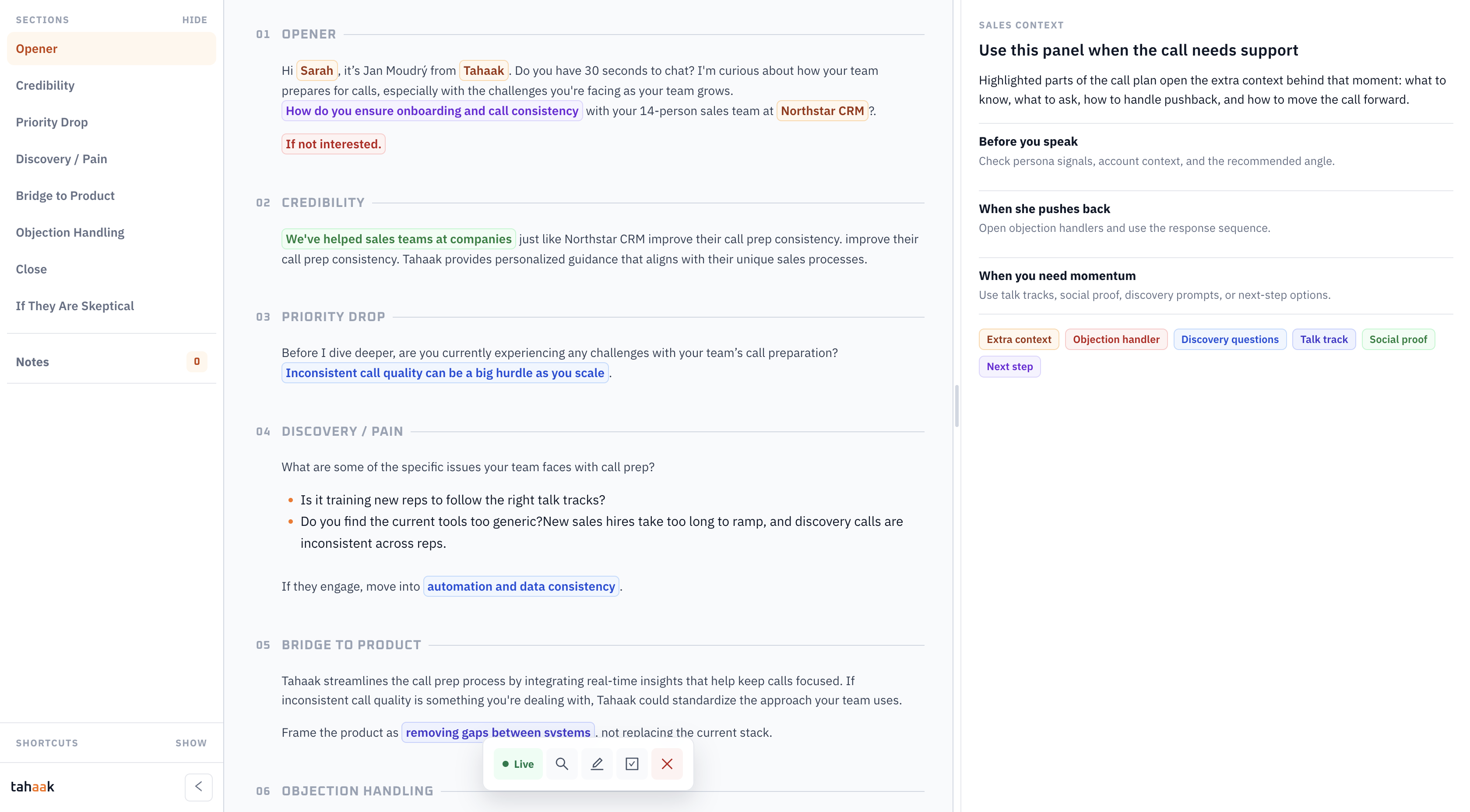
Tahaak keeps the structure, talking points, context, objection handlers, and notes in one live workspace, so the rep does not have to jump between docs while the call is moving.
Live call / Workspace preview
Call plan, context, and notes in one view
Template builder
Tahaak templates can be written manually, generated with AI, or enriched with reusable helpers that reps can open during the call.
01
Define the flow your reps should follow: opener, credibility, discovery, objection handling, and close.
02
Use AI to draft opening angles, questions, objection responses, and follow-up prompts for each lead.
03
Attach reusable context reps can open when the call needs support, without cluttering the main script.
04
Edit the template while checking the rendered call plan, so guidance stays practical instead of over-scripted.
Reusable helpers
Helpers give reps quick access to proof points, objection responses, discovery prompts, next-step options, and talk tracks while the call is live.
Template preview
If they push back
Open objection handlers and use the response sequence.
When you need momentum
Use talk tracks, social proof, discovery prompts, or next-step options.
Integrations
Turn the contacts your team already keeps in HubSpot into personalised call plans before the conversation starts.
Live
Import contacts from HubSpot and prepare each conversation from your team playbook.
Supported workflows
Run preparation, live guidance, notes, and manager coaching from the same call-plan workflow.
Coming soon
Additional connections are on the way. We’ll share them here as they become available.
For sales managers
Tahaak gives managers a practical view of how their outbound and discovery playbook is used, where coaching is needed, and which calls deserve review time.
Give every rep the same outbound or discovery structure, without handing them a static document.
See the themes managers need to coach: discovery quality, objections, and next steps.
Keep the plan, call context, and notes together so review starts with the right context.
Keep team playbooks, lead context, and live call plans in one shared workspace.
The call plan becomes the shared operating context for reps and managers.
01
Set the team playbook once.
02
Prepare every rep for the live call.
03
Coach from the moments that matter.
Ready to map it?
We’ll walk through your playbook, lead context, live guidance, and the manager view around the calls your team is already making.